
Every brand. Every channel.
Every customer.
Social media, CRM and an AI Assistant in one workspace, with every post checked before it goes live.
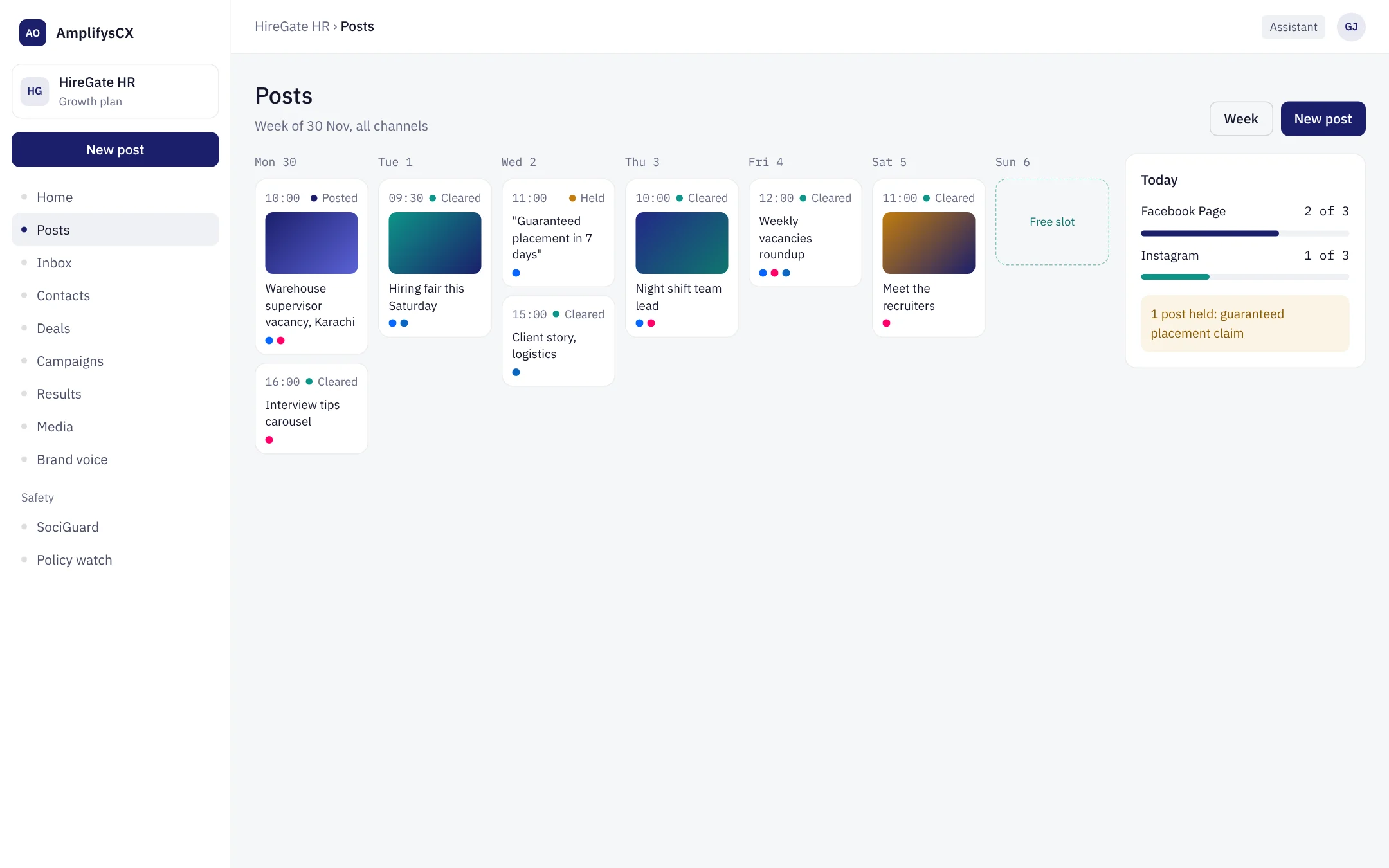
- 1Checked, then posted. Every post passes the checks before it goes out.
- 2Held for review. A guaranteed placement claim waits for a person.
- 3Daily limits. New Pages warm up slowly, two of three posts used today.
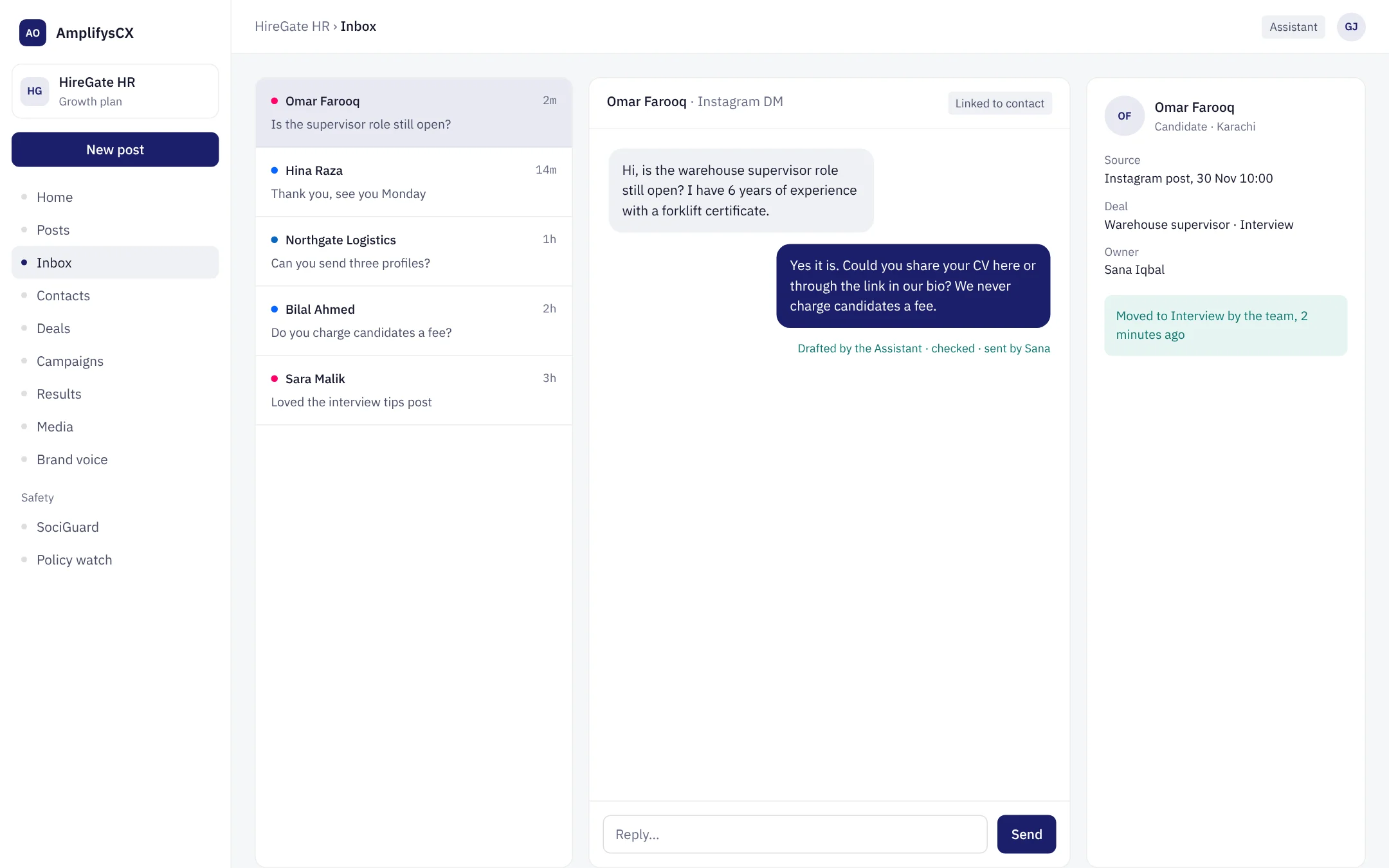
- 1One queue. DMs, comments and email from every channel.
- 2Drafted reply. Written in the brand voice, checked, then sent by a person.
- 3Linked contact. The source post is kept on the person.
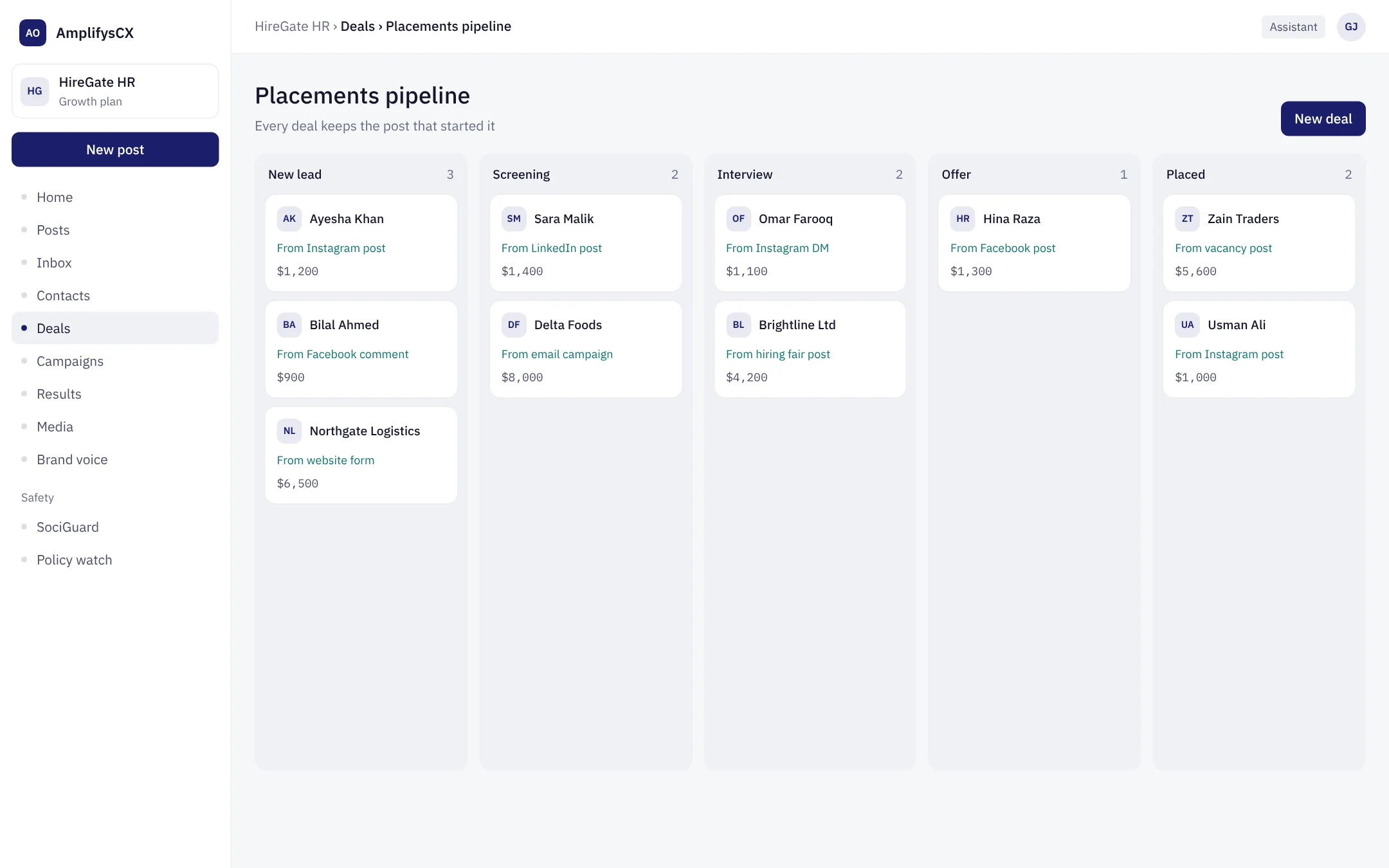
- 1Source on every deal. The post, comment or form that started it.
- 2Stages you define. One pipeline per brand.
- 3Won deals. Credited back to the channel in your reports.
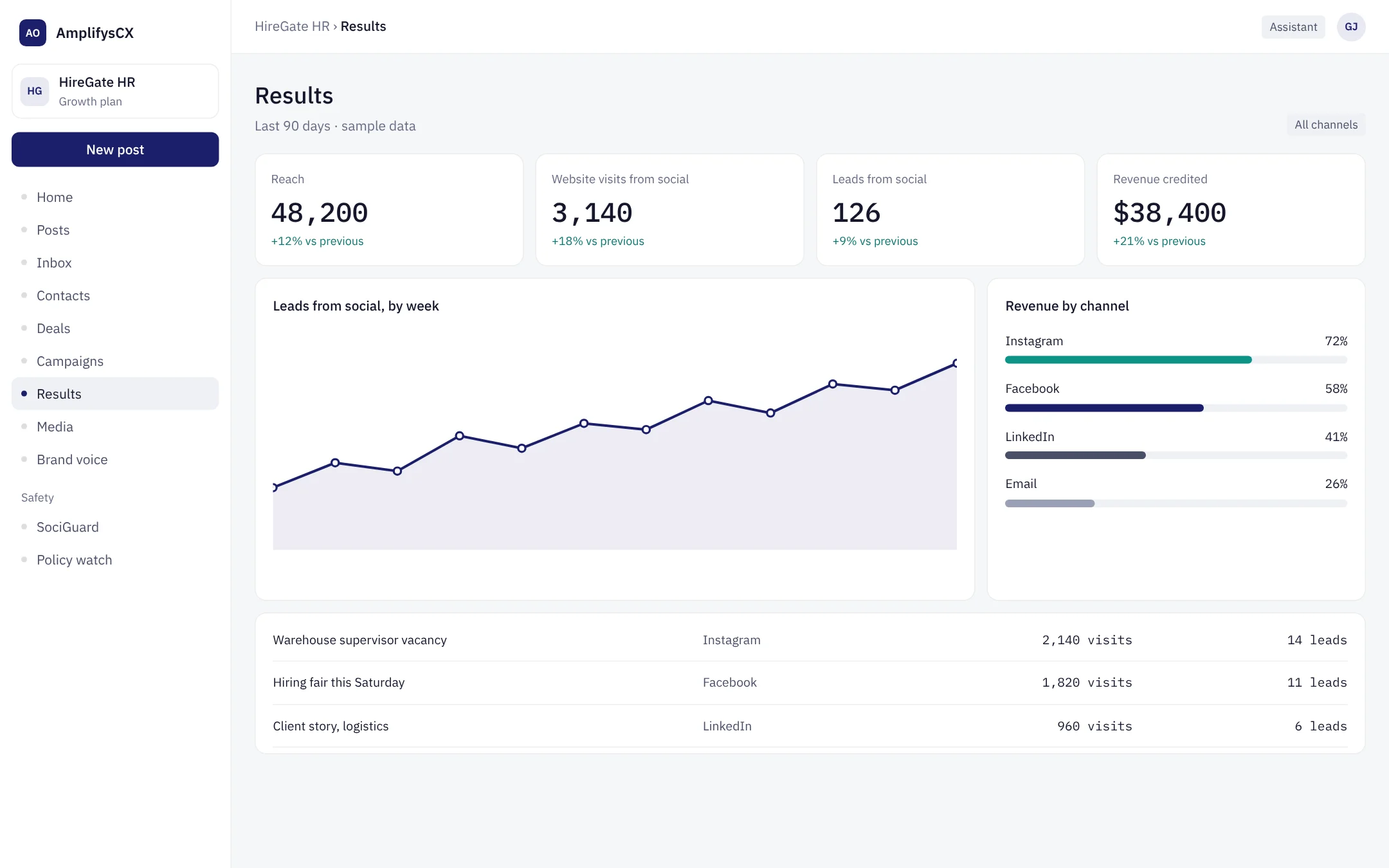
- 1Revenue credited. From deals that started on social.
- 2Leads by week. Trends per brand and channel.
- 3By channel. Which networks actually pay. Sample data.
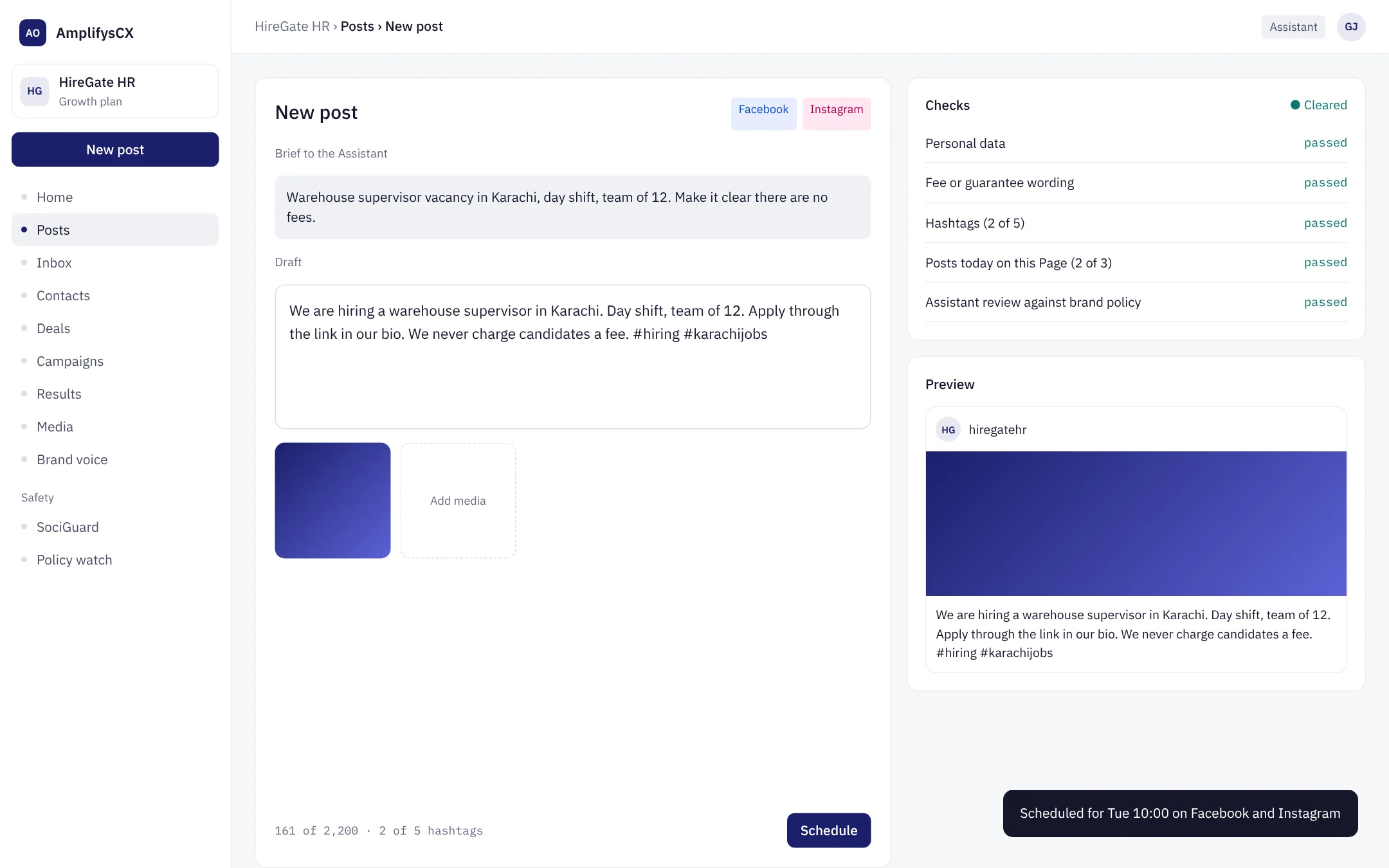
- 1Brief. Describe the post; the Assistant writes it.
- 2Five checks. Personal data, fee wording, limits and brand policy.
- 3Schedule. Unlocks only when every check passes.
Three tools, three logins and a spreadsheet in between. Or one workspace.
Publish with confidence
Plan every brand on one calendar. The Assistant drafts in each brand’s voice, and five checks run before a post can be scheduled.
Turn replies into customers
Comments and messages arrive in one inbox, become contacts, and move through a pipeline that remembers which post started it.
Measure what pays
See website visits, leads and revenue by post and channel, not just reach and likes.
Available now
Five checks before anything is scheduled.
Rules in code look for personal data, fee wording, unsupported claims and platform limits. Then the Assistant reads the post against your brand policy.
Rolling out
Every reply becomes a contact.
Messages and comments from every channel arrive in one inbox, already linked to a person and to the post that brought them in.
Rolling out
Deals that remember where they came from.
A pipeline for each brand, with stages you define. When a deal is won, the post that started it gets the credit.
See every post the way your audience will.
Previews for each network before you schedule, checks you can see, and a watch on the comments once it is live.
Illustrations with sample content.
Ask for a week of posts. Get a plan you can check.
The Assistant drafts in each brand’s voice and explains its choices. It never publishes on its own and never sees your account keys. Your rules decide what goes out.
Sample conversation.
Rolling out
Work with AmplifysCX from Claude and ChatGPT.
Connect your workspace to the AI assistant your team already uses through our MCP connector. Ask how a brand did last week, pull a list of new leads, or send drafts to the planner without opening another tab.

Claude
Add as a custom connector

ChatGPT
Add as a connector
- Read results, contacts and the calendar for brands you can access
- Create drafts only. Publishing still runs through your checks and your team
- Your social account keys are never shared with the assistant
Claude is a trademark of Anthropic. ChatGPT is a trademark of OpenAI. AmplifysCX is not affiliated with or endorsed by either company.
Sample conversation.
The watch doesn’t stop when the post goes out.
SociGuard scans comments on your posts for fee scams, personal data and policy problems. Each alert carries evidence, and a person decides.
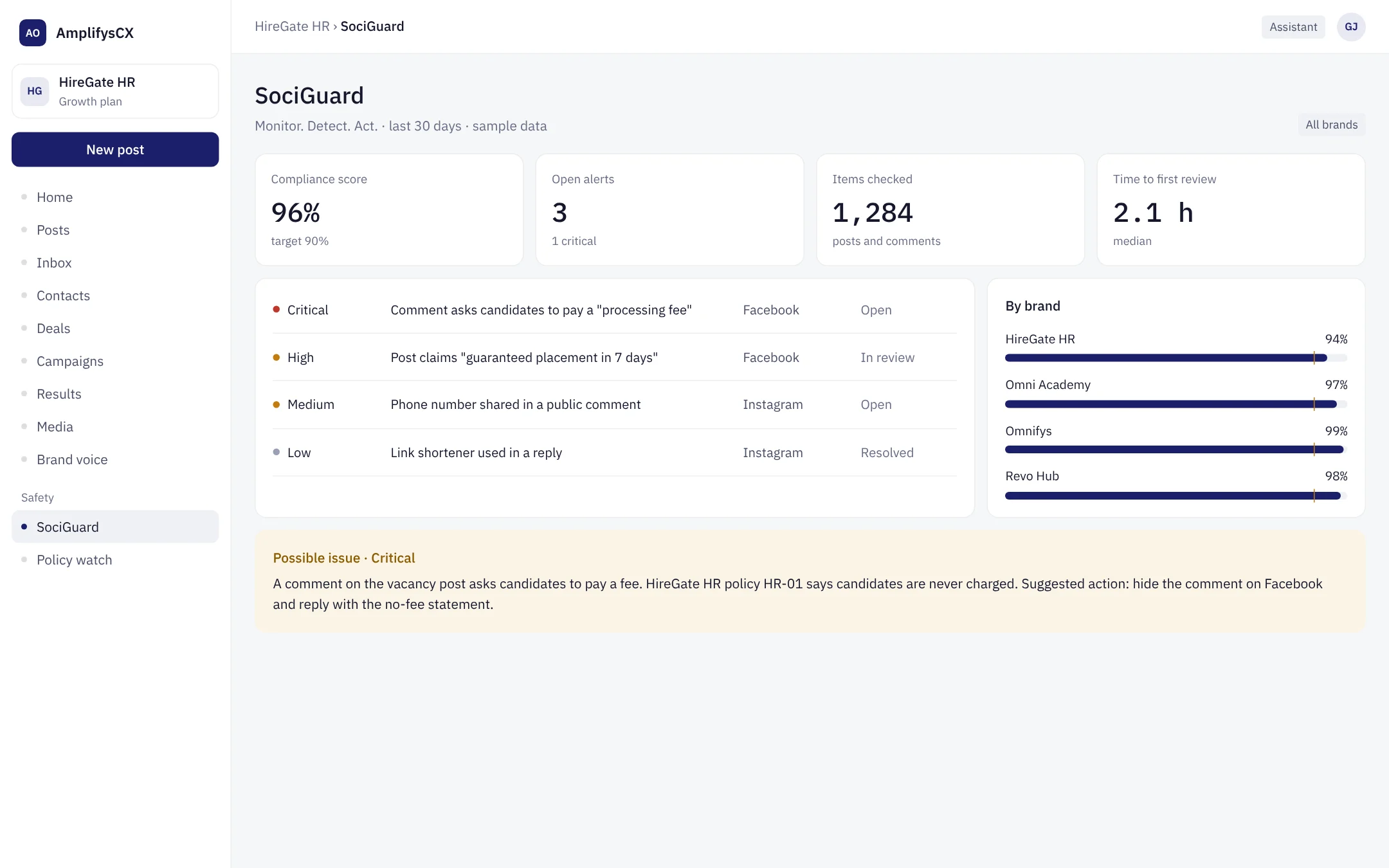
1. Caught in a comment. A request for a “processing fee” on a vacancy post.
2. Score per brand. Each brand measured against your target.
3. A suggested action. What to hide, and what to reply. Sample data.
Pick a plan by the brands you run.
Every plan includes your own workspace login, every product and the Assistant.
Starter
Up to 3 brands
[Price] / month
- Social publishing and calendar
- Assistant drafting and checks
- CRM contacts and pipeline
- Unified inbox
- Analytics
Most chosen
Growth
Up to 6 brands
[Price] / month
- Everything in Starter
- Approval steps and roles per brand
- Email campaigns and forms
- SociGuard comment monitoring
- Revenue attribution
Enterprise
More than 6 brands
Custom
- Everything in Growth
- Single sign-on
- Custom limits and data agreement
- Dedicated onboarding
- White label for agencies
| A social tool, a CRM and an email tool | AmplifysCX | |
|---|---|---|
| Logins | Three, each with its own users | One workspace login |
| Leads from social | Copied by hand or through a connector | Arrive in the CRM with the post that brought them |
| Several brands | Extra workspaces or seats | Built in, with a voice and rules for each |
| Before posting | Spelling and length checks | Platform rules, brand policy and an Assistant review |
| After posting | Comments in an inbox | SociGuard scans comments and flags problems |
Built on our own four brands first.
Before anyone else used AmplifysCX, it ran the social channels of a recruiter, a training academy, an AI services firm and a local venue. Its rules were written for situations those brands deal with every week.
HireGate HR
Recruitment
Vacancy posts checked for fee and guarantee wording before they go out.
Omni Academy
Training
Course announcements kept free of job and income promises.
Omnifys
AI services
Technical posts that never name a client without permission.
Revo Hub
Local venue
Short, friendly updates on a steady weekly rhythm.
Your accounts stay yours.
Sealed workspaces
Each customer workspace keeps its brands, contacts and data apart from every other.
Encrypted connections
Tokens for your social accounts are stored encrypted and never shown or sent to the Assistant.
Roles per brand
Admins, editors and viewers. Overriding a serious finding needs a second admin.
A full record
Every draft, check, approval and change is kept in an audit log.
Questions
Can I run several businesses from one account?
Yes. Your workspace holds 3 brands on Starter, 6 on Growth and as many as you need on Enterprise, each with its own channels, voice and pipeline.
Does the Assistant publish on its own?
No. It drafts and explains. Our code checks every post against platform rules and your policy, and only cleared posts can be scheduled.
Which networks are supported?
Facebook Pages and Instagram today, with Google Analytics and Search Console for results. LinkedIn, YouTube and TikTok are next.
Can agencies keep clients separate?
Yes. Each client can have its own workspace and login. Enterprise adds white label.
How is pricing worked out?
By the number of brands in your workspace, not by seats. Add the teammates each brand needs.